Automation
Invoice processing automation: how it works from receipt to payment
See how invoice processing automation works, from intake and extraction to coding, matching, approval and payment, and where finance stays involved.

When evaluating AP automation software, look at how it handles the following processes: invoice intake and data extraction, coding, purchase order matching, approval workflows, exception management, audit trails, ERP integrations, reporting and visibility, human oversight and decision-making, scalability, and whether it can connect to procurement if you need procure-to-pay capabilities. The right choice depends on how well the software fits your organization's workflow, controls, current and future requirements.
When researching the best AP automation software, finance teams are often presented with extensive feature lists and broad capability claims. However, the number of features alone does not indicate how well a platform will support an organization's actual processes and requirements. Two solutions may offer similar functionality but differ significantly in how they handle incomplete invoices, unclear coding or approval delays.
A more effective evaluation considers how well the software aligns with your workflows, supports financial controls, simplifies day-to-day tasks, manages exceptions, integrates with existing systems and accommodates future requirements.
This guide provides a practical framework for comparing AP automation software, including the key capabilities to assess, questions to ask during product demonstrations, how to evaluate AI claims, and the differences between AP automation and procure-to-pay. The aim is to help you make an informed decision based on your organization's needs, both now, and as they evolve.
AP automation software manages the accounts payable workflow for supplier invoices. It typically supports invoice capture, data extraction, coding, matching, approval routing, exception management, audit trails, and reporting and status visibility. For a broader overview, see our guide to AP automation.
Procure-to-pay software covers a wider scope. It connects purchasing, from purchase request through to purchase order, with the AP process that follows, so the whole cycle from request to payment runs in one connected workflow. Some organizations need standalone AP automation. Others benefit from connecting procurement, particularly where a large share of spend runs through purchase orders. Neither is automatically the better choice; it depends on where your processes need the most support.
The most useful preparation for any software evaluation is a clear picture of how your AP process works today. Without it, it's easy to be guided by a vendor's feature list rather than your own requirements. Before speaking to vendors, work through questions such as:
How do invoices currently arrive, and in what formats?
How are invoice details captured today?
Who codes invoices, and how are coding decisions made?
How are purchase orders created, and what proportion of invoices have an associated purchase order?
How does matching happen, and what happens with non-PO invoices?
How are approvals routed, and what approval authority does each role have?
Where does your team spend the most time on manual tasks, follow-ups and rework?
Where do exceptions typically occur?
How do you monitor invoice volumes, processing times and outstanding liabilities?
How are invoices tracked while they are in progress
What financial controls are in place to prevent duplicate payments, incorrect amounts or unauthorized approvals?
How are records reconciled at month-end?
How are payment runs managed, and how are approved invoices prepared for payment?
What audit records and documentation are required to support your AP process?
Which ERP or accounting systems does your AP process need to integrate with?
The answers become your evaluation criteria. Software should fit the process you actually run, or the process you have decided to move to, rather than your team adapting to a feature list.
Start with how invoices are received by your AP team and which formats are supported. Then look at how invoice data is captured and extracted, how uncertain data is flagged for review, and how easily reviewers can check and correct captured information. A demo that only shows clean digital invoices won't tell you much; ask to see a poor scan or an unusual layout. Our guide to invoice data extraction explains what effective capture involves.
Coding structures differ between organizations, so the question is whether the software can reflect yours. Evaluate how coding rules are set up, whether transaction history, supplier defaults and purchase order information can inform coding, whether the system offers coding suggestions, and how easily users can correct them. Check how invoices are coded across multiple dimensions or cost centers, whether coding can be automated, and where finance review and approval fit into the process. For more on how coding decisions are made, see invoice coding.
Matching checks an invoice against approved purchasing information, and it is a separate step from coding. Evaluate how invoices are matched against purchase orders, how goods or services received are accounted for, how mismatches are identified, and how clearly the software explains why an invoice does not match Visibility is important: reviewers should be able to see exactly what differs, rather than simply being notified that a mismatch has occurred.
The key question is simple: can the workflow reflect how your organization actually approves spend? Evaluate how approval rules are configured, how invoices are routed, whether delegated and mobile approvals are supported where needed, how clearly approval status is displayed, and what controls ensure that only authorized users can approve invoices.
Exception handling is an important part of evaluating AP automation software. Straightforward invoices are easy to process; The more important consideration is whether the software helps teams identify which invoices require attention and understand why.
Evaluate how exceptions are identified and flagged, how they are assigned, how reviewers investigate them, how corrections are recorded, and how an exception affects the invoice's workflow status. No software eliminates exceptions entirely. The difference lies in how clearly issues are presented, how effectively they are routed to the right people, and whether reviewers have the information they need to resolve them.
A strong audit trail shows who performed each action, what changed, who approved the invoice, when each step happened, and the invoice's current status. This is central to financial control and audit readiness. When evaluating software, ask to see the audit record for a single invoice from start to finish.
Finance teams need to understand invoice status, approval status, processing activity and volumes, where bottlenecks are forming and how the AP process is performing over time. Look for reporting that helps track key performance measures such as invoice processing times, approval turnaround times, extraction accuracy, and invoice volumes. Evaluate whether this information is easy to access and understand for the people who need it, from AP clerks and managers to the CFO.
AP automation works alongside your ERP or accounting system rather than replacing it, so integration determines how much manual work remains. Evaluate which systems are supported, which direction data flows, how synchronization works, how approved invoices move into the accounting environment, how coding and supplier information are kept consistent, and what happens when data in the two systems doesn't align.
"AI-powered" on its own tells you very little. The useful questions are about what the AI actually does:
What does the AI assist with: extracting and reviewing invoice information, suggesting coding, identifying potential exceptions, risk assessment or recommendations?
How does the software communicate confidence levels, flag uncertainty and explain potential risks or recommendations?
Which tasks are rule-based rather than AI-assisted?
Where does human review and decision-making happen?
Transparency: can users understand what the AI has identified, why it has flagged something and how confident it is?
Can finance users correct or override suggestions, retaining authority over important decisions?
Evaluate what the AI actually does, not simply whether the vendor uses the word. The most useful AI supports the finance team's judgment and keeps decisions and accountability with people. We look at this in more detail in AI invoice processing with finance teams in control.
AP automation focuses on the accounts payable workflow, from invoice receipt through to approval and payment. Procure-to-pay connects purchasing activity with those downstream AP processes.
In a connected procure-to-pay process, a purchase request is approved and a purchase order is issued, which may require its own sign-off depending on the organization's rules. Goods or services are received and tracked, the invoice arrives and is matched against the approved purchase order and goods received note, and the invoice is approved and paid, with an audit trail covering the entire process.
The value of this connection is that AP teams have approved purchasing information to match invoices against, rather than processing invoices without that context. It is worth considering if a significant proportion of your spend is managed through purchase orders or if you need purchasing and AP controls within one platform. If most of your invoices are non-PO, or procurement is already managed effectively elsewhere, standalone AP automation may be sufficient.
A simple matrix keeps vendor conversations focused on your requirements rather than on each vendor's strengths.
| Evaluation area | Questions to ask | What to look for |
| Invoice capture | How are invoices received and captured? | Support for the formats and channels you use |
| Data extraction | How are invoice fields captured and reviewed? | Accurate extraction |
| Coding | How are coding rules configured, and how are coding suggestions reviewed? | Support for your coding structure, appropriate automation, and easy review and correction by finance users |
| PO matching | How are invoices matched against purchase orders, and how are discrepancies handled? | Clear identification of discrepancies and explanations of why an invoice didn't match |
| Approvals | Can workflows reflect our approval structure and route invoices accordingly? | Configurable approval rules, delegated approvals and permissions that ensure only authorized users can approve invoices |
| Exceptions | How are exceptions identified and resolved? | Clear explanations of issues, supporting context for reviewers and visible status |
| AI | What does AI actually assist with? | Clearly defined capabilities, explainable recommendations and human oversight of decisions |
| Audit trail | Can we see who did what and when throughout the AP process? | Complete, traceable records of actions, changes, approvals and supporting documentation |
| Reporting | What visibility do finance teams have into AP activity and performance? | Easy access to invoice status, extraction accuracy, processing and approval times, volumes and bottlenecks |
| Integrations | Does the software integrate with our ERP or accounting system? | Reliable data synchronization, compatibility and clear handling of integration errors |
| Procurement | Can AP connect to purchasing if needed? | A path to broader procure-to-pay capabilities as requirements evolve |
| Controls | Where do finance users retain review and approval authority? | Clearly defined approval permissions, human oversight and decisions made by authorized people |
Product demonstrations often focus on straightforward invoice scenarios. These questions help reveal how the software performs when processes are less predictable and exceptions arise.
Demonstrate what happens when an invoice arrives.
What happens when invoice information can't be confidently extracted?
How does a non-PO invoice move through the process?
How are approval rules configured?
How are coding rules configured?
Can users correct suggested coding?
How are invoices that span multiple cost centers handled?
How are mismatches identified?
What happens when an invoice doesn't match the purchase order?
How does goods received information affect matching?
How are exceptions identified?
Who can resolve them?
Can we see an explanation for why an invoice was flagged?
What specific tasks does the AI perform or assist with?
Which tasks are handled through predefined rules or standard automation?
Where does human review happen, and can users correct or override AI suggestions?
Which decisions remain the responsibility of finance?
What information does the audit trail capture?
Can we see who actioned or approved an invoice, and when?
How are approval permissions configured and controlled?
Can approval authority be restricted by role, amount, or other business rules?
Which ERP or accounting systems does the software integrate with?
What information is exchanged between the systems?
How frequently is information synchronized?
How are integration errors identified, reported, and resolved?
Choosing based on feature count alone. More features don't necessarily mean a better fit for your processes. A shorter feature list that aligns with how your team works may deliver more value.
Prioritizing AI before understanding the workflow. AI should address a specific process need. Treating it as a standalone feature or checkbox tells you little about how effectively it will support your AP team.
Overlooking exceptions. Ask what happens when an invoice is incomplete, unusual or doesn't match a purchase order. These scenarios often require the most manual intervention and take up valuable time.
Forgetting non-PO invoices. Not every invoice is linked to a purchase order. Make sure the software can handle non-PO invoices with appropriate coding, review and approval rules.
Exception rate: Measures how frequently invoices are flagged for matching or validation issues.
Treating coding and matching as the same thing. These are separate parts of the AP process. A platform may be strong at one but offer more limited capabilities in the other, so evaluate both independently.
Overlooking integration requirements. Software that doesn't integrate effectively with your ERP or accounting environment can create additional manual work, data inconsistencies, and downstream delays.
Underestimating financial controls and auditability. Automation still requires appropriate financial controls, clearly defined approval permissions and a complete, traceable record of invoice activity, including who took action and when.
Fraxion is one platform to consider against these criteria. Available as a standalone AP automation solution or an all-in-one procure-to-pay solution, it's built for mid-market organizations and designed to support the needs of the Office of the CFO.
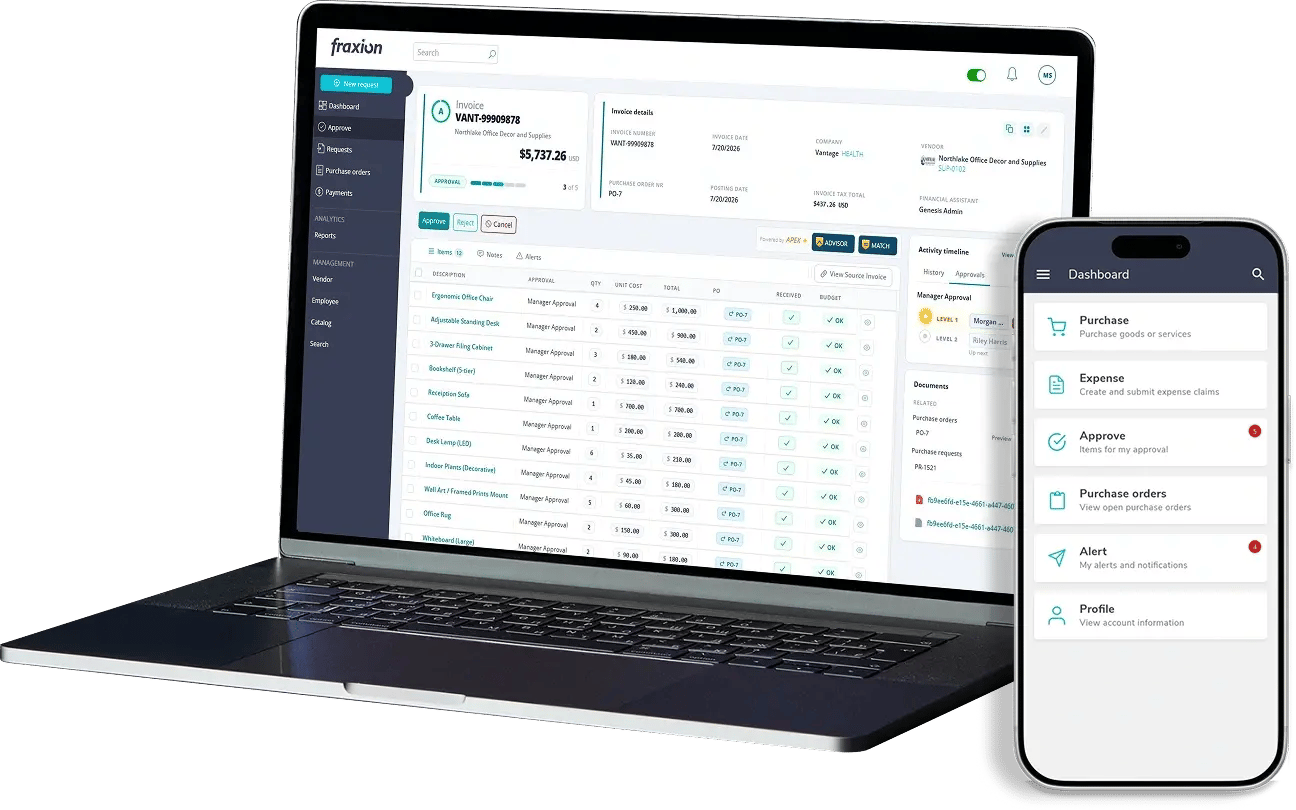
Fraxion's AP automation provides AI-assisted invoice processing, covering invoice data extraction and review, coding, invoice matching and automated invoice approvals, with risk assessment, faster identification of exceptions and recommendations. Fraxion's AI supports the finance team's judgment and decision-making authority rather than replacing it. Fraxion provides a full audit trail from requisition through payment, and approvers can review and approve invoices through the mobile app.
For organizations considering AP automation alongside broader procure-to-pay requirements, Fraxion offers the flexibility to start with AP and expand into purchasing and full procure-to-pay on the same platform, without reimplementation. This connects AP with approved purchasing information and provides a foundation for more connected spending controls.
Fraxion also integrates with cloud, legacy, and niche ERP and accounting systems, including Sage, Microsoft Dynamics, NetSuite, QuickBooks and Xero, and is SOC 2 compliant.
To see how Fraxion can automate, guide, and scale your AP process, get in touch to arrange a personalized demo.
What is AP automation software?
AP automation software helps manage and streamline the accounts payable process, from invoice receipt and data capture through extraction, coding, matching, approval routing and exception management. It also provides audit trails and visibility into invoice status, helping finance teams reduce manual work, maintain financial controls and manage invoices more efficiently.
What features should AP automation software have?
Key features include invoice intake and AI-assisted data extraction, coding support, purchase order matching, configurable approval workflows, exception management, comprehensive audit trails, reporting and performance visibility, and integration with ERP and accounting systems. Look for AI capabilities that help identify potential risks, flag exceptions and support decision-making, while keeping finance teams involved in reviewing information and approving transactions.
How do I compare AP automation software?
Start by mapping your current AP process and identifying your key requirements. Use these to build a comparison matrix, then evaluate each platform through product demonstrations. Test how it handles exceptions, non-PO invoices, approval workflows, integrations and AI-assisted tasks, including where human review and decision-making take place.
What is the difference between AP automation and procure-to-pay software?
AP automation focuses on managing the accounts payable workflow, from invoice receipt through processing and payment. Procure-to-pay software extends this process upstream by connecting purchasing activities, from purchase request and purchase order through to invoice processing and payment. This gives AP teams approved purchasing information to match invoices against.
Does AP automation software use AI?
Some AP automation software includes AI-assisted capabilities for tasks such as extracting and reviewing invoice data, suggesting coding, identifying potential exceptions and assessing risk. Capabilities vary between platforms, so ask vendors what their AI actually does, how it explains its findings and where human review and decision-making remain part of the process.
How important are ERP integrations for AP automation?
Very important. AP automation works alongside the ERP, so the integration determines how reliably approved invoices, coding and supplier information reach your system of record.
How does AP automation handle invoice exceptions?
AP automation identifies and flags invoices that require attention, such as those with mismatched amounts, missing information or unusual details. It helps reviewers understand the issue and investigate discrepancies, while finance teams retain responsibility for deciding how exceptions are handled.
Choosing AP automation software is about finding the right fit for your organization's processes and requirements, not simply comparing feature lists. Consider how well a platform supports your workflows and approval structure, handles exceptions and non-PO invoices, separates coding from matching, integrates with your ERP, and provides the visibility and audit trail your finance team needs. Equally important is whether it can reduce manual effort and processing time, help mitigate financial and operational risks, and support accurate, timely payments.
AI capabilities deserve the same scrutiny. Look beyond the claims to understand what the technology actually does, how it supports finance teams and where human oversight and decision-making remain.
The right AP automation software should address your biggest AP challenges today while giving you room to adapt as your business evolves. If Fraxion is on your shortlist, our team can walk you through its capabilities and show you how it measures against these criteria.
See how invoice processing automation works, from intake and extraction to coding, matching, approval and payment, and where finance stays involved.
Most AP exceptions are preventable. See how connecting purchasing and AP in the same system reduces manual work, improves match rates, and speeds up...
Gain real-time visibility into spend before it happens. Learn how proactive procure-to-pay processes help finance teams prevent overspending.
Get our latest content, updates, and how-to resources delivered to your inbox.
Book a demo to see how Fraxion can assist your organization.
Book a demo