Invoice processing automation: how it works from receipt to payment
Invoice processing automation moves a vendor invoice through a defined workflow: the invoice is received, its data is extracted and reviewed, it is coded, matched against a purchase order where one exists, validated, routed for approval and passed to payment. Routine invoices can follow this path with little intervention, while exceptions are flagged for the finance team to investigate and resolve.
Most of the difficulty in invoice processing isn't the data entry itself. It's what happens between steps. In a manual process, every stage depends on a hand-off, whether that's an email forwarded to a colleague or a document passed between desks, and each hand-off introduces the risk of processing delays, missed steps, or reduced visibility into an invoice’s status. The process may function, but limited visibility makes it harder to monitor progress and maintain control.
This article follows an invoice from receipt to payment, stage by stage, explaining what invoice processing automation does at each point and where people stay involved. It also explains the distinction between straight-through and exception workflows, the factors that can disrupt processing, the role of AI, and how to evaluate workflow performance.
What is invoice processing automation?
Invoice processing automation is the use of software to manage the repeatable steps involved in handling vendor invoices: receiving them, capturing their data, validating and coding them, matching them against purchase orders and goods received, routing them for approval and tracking their progress. Invoice processing is one component of accounts payable automation, focusing specifically on the invoice lifecycle. For a broader overview of AP automation and how it fits into the wider finance function, see our guide to AP automation
Manual invoice processing can be effective at lower volumes, when a small team can manage invoices through a shared inbox and spreadsheet. As invoice volumes grow, however, the process often becomes more complex, involving multiple email inboxes, spreadsheets, manual data entry, document hand-offs, approval follow-ups and separate systems. This can make it increasingly difficult to track individual invoices and their status. Automated invoice processing introduces a structured workflow, with defined steps and clear visibility into each invoice as it moves through the process.
From invoice receipt to payment, stage by stage
The stages below describe a typical invoice workflow. Processes vary by organization: not every invoice has a purchase order, approval rules differ, and payment may happen through an AP platform, the ERP, a dedicated payments platform, or another payment process.
Invoice receipt
Invoices enter accounts payable through various channels, including email attachments, uploads and scanned paper documents. In a manual process, these invoices may be distributed across shared AP mailboxes, individual inboxes and physical documents, making it difficult to maintain consistent oversight. Invoice processing automation begins with invoice intake, bringing invoices from different sources into a centralized, controlled workflow. This establishes visibility from the point of receipt and reduces reliance on manual forwarding, helping ensure invoices are captured and routed for processing consistently.
Invoice data extraction
Once an invoice is in the workflow, its key details are extracted: vendor, invoice number, invoice date, line items, tax and totals. This reduces the time and effort required to enter invoice details manually, while helping minimize data entry errors.
Extracted data isn't automatically correct. Poor-quality scans, unusual layouts and handwritten notes can all produce uncertain fields, so the workflow flags them for someone to check before the invoice proceeds to the next stage. How extraction works, and how review fits into it, is covered in our guide to invoice data extraction.
Invoice coding
Coding allocates the invoice to the appropriate account. Depending on the organization, that can mean general ledger accounts, cost centers, departments or projects. Automation can apply coding from the purchase order, from vendor defaults, historical transactions, or from coding rules, which removes much of the lookup work for routine invoices.
New vendors, unusual spend or invoices that span several cost centers may still need someone in finance to confirm or correct the coding. For more on this stage, see invoice coding.
Extracted data is validated and reviewed
Where a purchase order exists, the invoice is matched against it. Two-way matching checks the invoice against the purchase order. Three-way matching adds the record of goods or services received, so the invoice is checked against both what was ordered and what was received
Matching helps identify discrepancies, such as differences in price, quantity or vendor details. It does not guarantee an invoice is correct, but highlights areas that require further review.
Not every invoice has a purchase order. Recurring services, utilities and some professional fees are often invoiced without one, so these invoices rely on approval and validation rules rather than matching.
Validation and exception identification
Before an invoice goes for approval, the workflow checks whether anything needs attention. Invoices that pass move on. Invoices that don't are flagged as exceptions, for reasons covered in more detail below.
Identifying an exception is not the same as resolving it. Automated matching can show that an invoice price is higher than the purchase order price. Someone in the finance team still needs to decide whether to accept the difference, query it with the vendor or reject the invoice.
Approval routing
Once an invoice is coded, matched and validated, it is routed to the person who needs to approve it. Routing follows the organization's rules, which might be based on department, amount, vendor or other criteria, and different organizations structure these rules differently.
Routing and approving are separate steps. Automation decides where the invoice goes, based on the rules the finance team has set. The authorized approver decides whether it should be paid, and that decision is recorded.
Payment
After approval, the invoice moves into the payment process. Depending on the organization's setup, payment may happen within the AP or procure-to-pay platform, through the ERP or through another connected financial system. Either way, the invoice should arrive with its coding, matching and approval history intact, so nothing has to be re-entered.
Audit trail and reporting
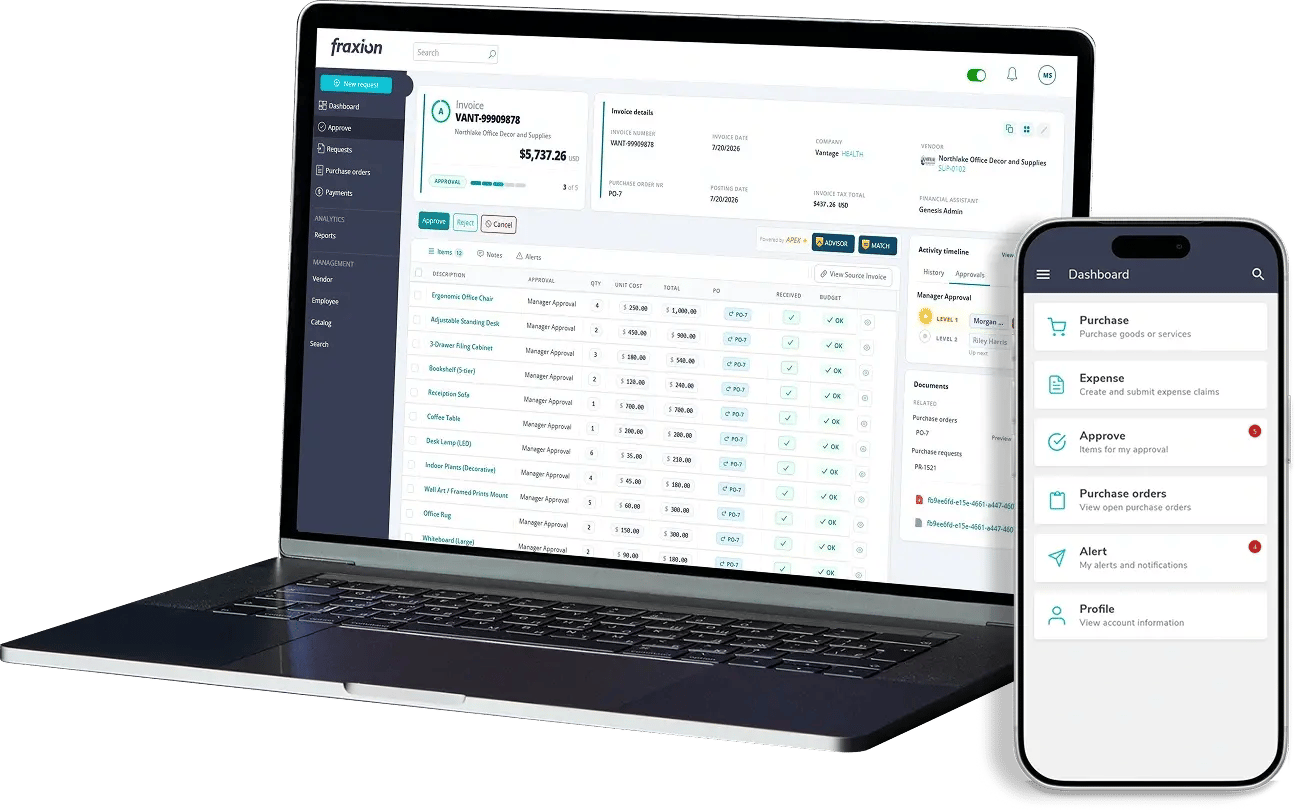
Throughout the process, the system keeps a history of each invoice, including its activity timeline, the approvers, user notes, and changes. Each invoice also shows its current workflow step, so the team can see where it stands without searching emails and files.
The straight-through path and the exception path
Broadly, an invoice follows one of two paths.
| Path | What happens | Where people are involved |
| Straight-through path | The invoice arrives, data is extracted, coding and matching checks are completed, and the invoice progresses through approval and payment according to defined rules | Minimal or no manual intervention, depending on the software's capabilities, system configuration, validation rules and approval requirements |
| Exception path | The invoice arrives, a discrepancy or issue is identified, and the invoice is routed for review. Once resolved, it returns to the workflow to continue through approval and payment | Investigating the issue, deciding on the appropriate resolution, and approving the invoice where required |
Not every invoice will qualify for straight-through processing, and that is expected. Automation allows routine invoices to progress through defined workflow steps with minimal manual intervention, while routing exceptions to the appropriate people for review and resolution.
What can interrupt the automated flow?
An invoice moves to the exception path whenever it requires human review. Common reasons include:
| Issue | What usually happens next |
| Missing information | The invoice is held while AP requests the missing details from the vendor or requester |
| Uncertain extracted data | Flagged fields are reviewed and corrected before the invoice moves on |
| Purchase order mismatch | The team checks the price, quantity or vendor difference and decides whether to accept, query or reject the invoice |
| Missing purchase order | The team confirms whether a purchase order should exist, or handles the invoice under non-PO approval rules |
| Unusual coding | Finance confirms the correct accounts, cost centers or projects |
| Policy exception | The appropriate person reviews the invoice against policy |
| Approval delay | The invoice awaits approval, with its status indicating where it is pending |
| Vendor dispute | The invoice is held until the issue is resolved with the supplier |
| Duplicate invoice | The potential duplicate is investigated to confirm whether the invoice has already been submitted or processed |
| Tax discrepancy | The team reviews differences in tax amounts, rates or calculations and requests clarification or correction where necessary |
| Missing receiving documentation | The team obtains or verifies the goods receipt or other required evidence before proceeding with matching and approval |
In each case, the pattern is the same: the invoice is flagged, someone investigates, the issue is resolved and the invoice returns to the appropriate stage of the workflow. Exceptions aren't a sign that the system has failed. They are the controlled part of the process that makes sure invoices needing judgment get it.
Where purchasing information helps
Validation is more straightforward when an invoice relates to an approved purchase. Once a purchase request has been approved and a purchase order issued, AP can match the invoice against the approved order and, where applicable, a goods receipt record. Non-PO invoices follow a separate approval process in line with the organization’s policies.
How automation changes each stage
| Stage | Manual process | Automated process | Where people stay involved | |
| Receipt | Invoices distributed across inboxes, desks and files | Invoices enter one structured workflow | Handling unusual documents and intake exceptions | |
| Data extraction | Invoice details entered manually | Invoice data extracted, with uncertain fields flagged | Reviewing and correcting flagged fields | |
| Coding | Codes looked up and entered manually | Codes suggested from POs; vendor Invoices matched against POs and receipt records; defaults, historical transactions, or rules | Reviewing and confirming suggested codes, particularly for new or unusual transactions | |
| Matching | Documents compared manually | Invoices matched against POs and receipt records | Reviewing discrepancies and determining appropriate action | |
| Exceptions | Often found during review or later | Exceptions flagged during processing | Investigating and resolving issues | |
| Approval | Requested and followed up manually by email or in person | Routed according to defined rules | Reviewing and approving invoices | |
| Status | Tracked by requesting updates from colleagues | Visible in the workflow | Following up on delayed invoices | |
| Audit trail | Reconstructed from emails and files | Actions recorded automatically as part of the process | Reviewing the record when needed |
How AI fits into invoice processing
It is important to distinguish automation from AI. Automation applies predefined rules to tasks such as routing invoices above a specified amount to the appropriate approver or matching invoices to purchase orders. AI supports tasks that require assessment, such as reviewing extracted data, suggesting coding, assessing risk, identifying potential exceptions and recommending next steps.
In both cases, the finance team makes the decisions. AI can suggest a code or highlight an invoice that looks unusual, but people confirm, investigate and approve. We look at this in more depth in AI invoice processing with finance teams in control.
Measuring invoice processing performance
Several key metrics can help assess how effectively the invoice workflow is performing:
-
Time from receipt to approval: Measures how long invoices take to move through the workflow
-
Approval turnaround time: Measures how long invoices wait for approver action
-
Manual intervention rate: Measures the proportion of invoices that require manual review or intervention
-
Exception rate: Measures how frequently invoices are flagged for matching or validation issues
-
Exception resolution time: Measures how long it takes to investigate and resolve flagged issues
-
On-time payment rate: Measures the proportion of invoices paid by their due dates
Tracked over time, these metrics show where invoices are waiting and why. For how they fit into a wider business case, see AP automation benefits.
How Fraxion supports invoice processing automation
Fraxion is a procure-to-pay solution built for mid-market companies and designed for the Office of the CFO. Its AP automation can be used as a standalone solution, helping finance teams manage the invoice workflow from intake and invoice data extraction to coding, invoice matching and approval. AI-assisted risk assessment, exception identification and recommendations help teams determine the appropriate next steps, while decisions remain with the people responsible for finance.
Every transaction creates an audit trail, with visibility across the process from requisition through payment. Approvers can also review and approve invoices through the mobile app. For organizations looking to extend control beyond accounts payable, Fraxion connects invoice processing with procurement and payments, including purchase requests and orders approved within the platform. Teams can start with AP automation and scale to full procure-to-pay as their needs evolve, without reimplementation.
Fraxion integrates with ERP and accounting systems, including Sage, Microsoft Dynamics, NetSuite, QuickBooks and Xero.
To see how Fraxion can support your invoice processing workflow, speak to our team for a personalized walkthrough.
FAQs
What is invoice processing automation?
Invoice processing automation uses software to manage key steps in handling vendor invoices, including intake, data extraction, coding, matching, approval routing and status tracking. Finance teams remain responsible for reviewing exceptions, resolving discrepancies, approving, and making decisions that require human judgment.
What happens when an invoice doesn't match a purchase order?
The invoice is flagged as an exception. Someone in the finance team investigates the discrepancy and decides whether to accept it, query it with the vendor or reject the invoice. Once resolved, the invoice can continue through the workflow
Can invoice processing automation handle non-PO invoices?
Yes. Invoices without a purchase order follow a separate validation and approval process. Rules can route them to the appropriate approver based on factors such as department, invoice amount or organizational policy.
Does invoice processing automation replace AP staff?
No. Automation reduces manual work by handling tasks such as data extraction, matching and approval routing. AP staff continue to review uncertain data, investigate exceptions, resolve supplier queries and oversee the process, while authorized individuals retain responsibility for approval decisions where required.
What happens after an invoice is approved?
It moves to payment. Depending on the organization and platform, payment may be managed within the AP platform, through an ERP system or via another connected financial system. The invoice's approval and processing history can be retained in the audit trail.
Conclusion
An invoice moves through several stages, from intake and data extraction to coding, matching, validation, approval and payment, with a complete audit trail along the way. Invoice processing automation structures this workflow, allowing routine invoices to progress according to defined rules while directing exceptions to the appropriate people for review.
The decisions remain with the finance team, which reviews uncertain data, resolves exceptions and approves invoices where required. The goal is to reduce manual work and ensure that people can focus their attention where their judgment is needed most.